Slack Integrations & Automation
Make Slack Your Digital HQ
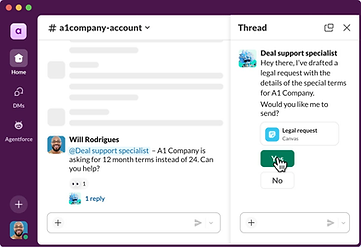
If you've recently started using Slack but your tools still feel scattered across dozens of apps, Slack isn't doing its job yet. We bring your tools together in Slack through marketplace apps, custom integrations, and custom-built Slack apps, then automate the repetitive work between them with workflows, so Slack becomes your team's real digital HQ instead of one more app.
The scattered-tools problem after adopting Slack
-
Updates still live elsewhere: your team checks Salesforce, a project board, or a spreadsheet separately because Slack doesn't know those updates happened.
-
Manual copy-paste work: someone re-types or screenshots information from one system into a Slack message instead of it appearing automatically.
-
Approvals handled over email: expense requests, time off, and purchase approvals still move through inboxes instead of through the tool your team is already in all day.
-
No single home for decisions: important updates and decisions end up scattered across tools instead of living in one searchable place.
Switching to Slack doesn't automatically fix tool sprawl, without integrations and automation, Slack just becomes another app your team checks alongside Salesforce, email, spreadsheets, and project boards instead of replacing the busywork of moving between them.

Digital HQ is Slack's own term for using Slack as the single place where your people, systems, partners, and customers connect, rather than one more communication tool alongside everything else.
What "digital HQ" actually means?
Slack describes a digital HQ as "a place to connect your people, systems, partners and customers, wherever you are", the idea is that instead of Slack sitting next to your other tools, your other tools connect into Slack, so your team has one place to work from. That only actually happens with real integrations and automation behind it, which is exactly what this service builds.
How we bring your tools into Slack?
We connect your tools to Slack three ways, marketplace apps for the fastest path, custom integrations when no off-the-shelf option fits, and custom-built Slack apps when your team needs something purpose-built around how you actually work.

Your tools, your workflows, your digital HQ.


How Implementology helps?
-
Assessment: we start by understanding which tools your team actually relies on day to day, and where information currently gets copied, re-typed, or chased down manually.
-
Implementation: we connect the right tools the right way, marketplace app, custom integration, or custom Slack app, and build the automations that remove the most repetitive manual work first.
-
Handoff and support: we document what's been built and can continue supporting or extending your integrations and automations through our Slack Managed Services.
Who this is for?
-
Recently adopted Slack: teams who moved to Slack but still feel like their other tools live in separate silos.
-
Growing teams hitting manual-process limits: organizations where approvals, updates, or reporting are still handled by hand and no longer scale.
-
Teams on Salesforce or similar platforms: organizations that want their CRM, support, or analytics data visible and actionable inside Slack instead of in a separate tab.
-

FAQs
CLIENTS
Trusted by innovative teams worldwide.