.png)

Slack + Agentforce for SMB CRM Updates: What's Live, What Works, and What to Know First

The CRM Adoption Problem Was Never About Discipline
Every SMB that's struggled with CRM adoption has run the same playbook: enforce a process, set a policy, retrain the team.
It doesn't hold. Not because people are lazy - but because the system sits somewhere separate from where work actually happens.
Reps are in Slack. On calls. On-site. The CRM is in another tab, waiting for someone to open it, reconstruct the context of a conversation from memory, and type it in - often hours after it happened.
The work itself happens in conversations. Quick messages before a client meeting. A phone call. A Slack thread that builds context over time. CRM captures the outcome of those conversations - but it's rarely where the collaboration itself lives. Too often, important details never make it in at all.
Salesforce's response - across multiple releases in Q1 and Q2 2026 - is architectural: move the CRM interface to where conversations already happen, and let AI handle the data entry.
That shift is now live. But it's not uniformly available, it's not zero-configuration, and it doesn't apply the same way to every SMB. This post explains what's actually shipped, what it does in practice, and how to evaluate whether it's the right move for your business right now.
What Actually Changed Between January and May 2026
Understanding what's new - and what's been available longer - matters before building any rollout plan.
Feature | Status as of May 2026 | Where Available |
Slackbot as AI agent (Agentforce-powered) | ✅ Live | All paid Slack plans |
Slack CRM - native deal/contact management | ✅ Live | Business+ (included, no extra cost) |
Agentforce Sales in Slack | ✅ Live | Requires Agentforce + Slack licence |
Agentforce deployable on all paid Slack plans | ✅ Live | Since June 2025 |
Free Slack workspace for all new Salesforce customers | ✅ Live | From May 15, 2026 |
Agentforce Operations (back-office process automation) | ✅ GA | From April 29, 2026 |
Flow + Agentforce ecosystem auto-sync | 🔜 Beta | Entering Beta, May 2026 |
Agent Exchange - unified app/agent marketplace | ✅ Live | All orgs |
Conversational Slack setup - no-code agent configuration | ✅ Previewed at TDX 2026 | Rolling out now |
Two points stand out specifically for SMBs.
First: Slack CRM is included with Slack Business+ at no extra cost and connects to Salesforce in the background. All contacts, deals, and records created through Slack CRM are automatically connected to Salesforce - so when your organisation is ready to scale to full CRM, all data is already there. No migration. No starting over.
Second: Starting May 15, 2026, every new Salesforce customer receives a free Slack workspace automatically connected to their CRM. Teams can automate lead assignment, workflow orchestration, and CRM updates directly from Slack. Existing Salesforce customers can connect Slack through a single admin toggle - Salesforce permissions carry over automatically.
What Is Slack CRM - And How Is It Different From Salesforce?
Slack CRM is a native pipeline management layer built into Slackbot, available on Business+ plans at no additional cost. It lets SMBs manage contacts, deals, and leads directly inside Slack. It runs on Salesforce infrastructure in the background - meaning all data is Salesforce-compatible and can scale into full Sales Cloud without migration.
The operational distinction:
Salesforce = system of record, automation engine, reporting layer
Slack CRM = lightweight entry point for teams not yet on full Salesforce
Slackbot + Agentforce = the AI layer that keeps both updated automatically
For an SMB evaluating this: Slack CRM is where you start. Full Salesforce + Agentforce is where you scale. The architecture is designed so you don't have to choose upfront.
How Does Agentforce Update CRM Records in Slack?
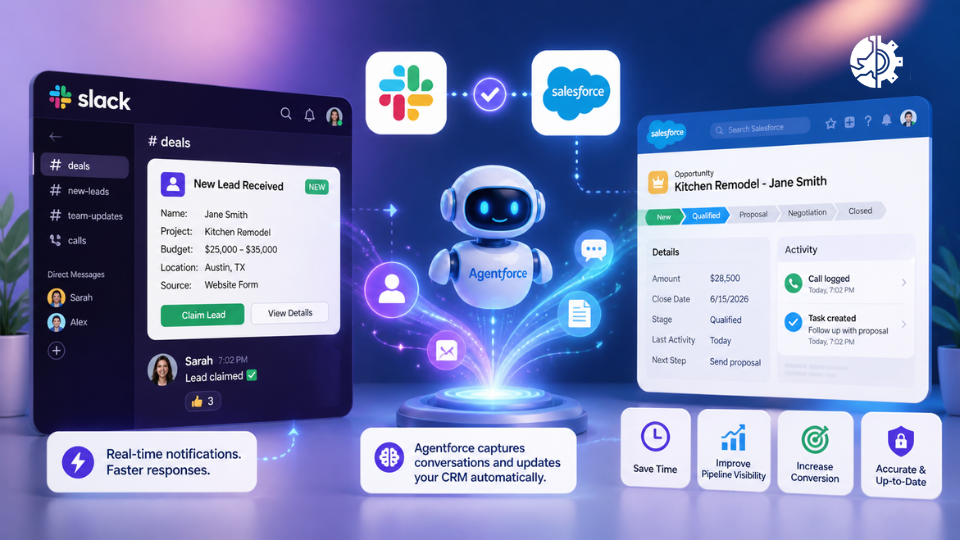
Agentforce monitors Slack conversations, call activity, and channel interactions to identify CRM-relevant events. It then either suggests updates to the rep for one-tap confirmation, or executes pre-approved updates automatically - logging activities, updating Opportunity stages, and creating follow-up tasks without the rep opening Salesforce.
Here's how that plays out across five real scenarios:
Scenario 1: After a Sales Call
A rep finishes a 45-minute discovery call. Budget confirmed. Timeline discussed. Decision-maker identified - all verbally, none of it in the CRM yet.
Slackbot draws on both Salesforce data and Slack conversation history to proactively suggest CRM updates based on what was actually said in the meeting - not what someone remembered to type afterward.
Within minutes, the rep receives a structured Slack message: a call summary with the Opportunity stage pre-filled and a next step already drafted. One tap confirms it. Salesforce updates. No login required.
Salesforce objects updated: Opportunity stage · Activity log · Contact notes · Next Step field · Last Activity Date
Operational implication: For a team running 10–15 calls per week, this eliminates an estimated 3–5 hours of weekly CRM admin - and produces more accurate records than manual entry written from memory at 5pm.
Scenario 2: An Inbound Lead at 7pm on a Friday
A homeowner submits a quote form. It lands in Salesforce as a new Lead record.
A Salesforce Record-Triggered Flow fires within 60 seconds. A structured card posts to your #new-leads Slack channel - visible on every rep's phone - showing project type, budget range, lead source, and contact details. A Claim Lead button assigns the Lead in Salesforce, timestamps the claim, and creates the follow-up task automatically.
No one needs to open Salesforce. No manager manually routes it.
Salesforce objects updated: Lead Owner · Response Timestamp · Assigned Date · Follow-up Task
Operational implication: Lead response speed is one of the strongest conversion predictors in home services and B2B services. Reducing response time from hours to minutes - through a notification mechanism your team actually sees - changes outcomes measurably.
Scenario 3: A Deal That's Gone Quiet
An Opportunity has been sitting at Stage 3 for three weeks. Nobody flagged it. The forecast still counts it as live.
Agentforce tracks Last Activity Date on every record. When the configured threshold passes - for example, 14 days with no logged contact - it sends a direct Slack message to the assigned rep: "The Mitchell Opportunity has had no activity in 14 days. Want me to draft a re-engagement message or adjust the close date?"
The rep responds in Slack. Salesforce updates automatically.
Salesforce objects updated: Close Date · Last Activity Date · Next Step · Opportunity Status
Operational implication: Pipeline accuracy improves without a weekly rep review call. Managers get a more honest forecast. Deals that would have silently died get a structured intervention before they're gone.
Scenario 4: A Manager Asking About an Account
Manager types in Slack: "Where are we with the Williams account?"
Slackbot is now the conversational interface for the full Customer 360. It surfaces the Opportunity summary, last contact date, open tasks, and close probability - sourced live from Salesforce - directly in the channel. The exchange takes 15 seconds. No one opens Salesforce.
Operational implication: Pipeline reviews, deal escalations, and account prep become faster and grounded in actual CRM data - because accessing that data no longer requires navigating the Salesforce UI.
Scenario 5: A Client Messaging Directly in Slack
A client sends a message about a project timeline change.
Salesforce Channels bring customer data and team conversations into one shared space. That client message is logged as an Activity on the Contact and Opportunity records - without any manual action from the rep.
Six months later, when someone asks what was agreed, the record exists.
Salesforce objects updated: Contact Activity History · Opportunity Last Touch Date · Salesforce Channel conversation linked to the record
What Is Agentforce Operations - And Why Does It Matter?
Agentforce Operations - generally available as of April 29, 2026 - extends AI agents from front-office sales workflows into back-office processes.
The core function: coordinating tasks, timelines, and handoffs between AI agents and humans for processes that typically bottleneck in email - approvals, document review, compliance steps, onboarding coordination.
For most SMBs, the Slack + Sales Cloud layer above is the right starting point. Agentforce Operations becomes relevant when your operational delays have moved downstream - approvals stuck in email, handoff processes that require manual coordination across teams, document-heavy tasks that need human sign-off at each step.
Ecosystem integration features - including the ability to auto-sync data and trigger actions with Salesforce Flows - are expected to enter Beta in May 2026. If your SMB already has clean Salesforce data and established Flows, this is worth tracking closely. The ability to trigger and complete approval workflows from Slack, without building custom code or routing emails manually, is a meaningful operational step forward.
The Three Realistic Setup Paths for SMBs Right Now
The right path depends on where you are - not where a vendor wants you to be.
Path 1 - Start in Slack CRM (No Salesforce Yet)
Who it's for: Teams under 10 people, straightforward sales processes, not ready to commit to a Salesforce implementation.
What you get: Native contact, deal, and pipeline management inside Slack on Business+. Slackbot handles basic pipeline tracking. All data sits in Salesforce infrastructure, ready to scale when you are.
What you don't get: Custom automation, lead routing rules, Agentforce qualification, escalation workflows, or full pipeline reporting.
Honest assessment: This is a genuine starting point - not a watered-down demo. For a small team currently tracking deals in a spreadsheet or basic CRM, Slack CRM removes meaningful friction from day one without requiring an implementation project.
Path 2 - Connect Existing Salesforce to Slack
Who it's for: Teams already on Salesforce who want real-time Slack visibility without rebuilding their current setup.
What to do: Enable the Slack connection in Salesforce Admin. Turn on Salesforce Channels. Build initial Record-Triggered Flows for lead and opportunity notifications. Configure Agentforce Sales.
At TDX 2026 (April 15–16), Salesforce previewed the ability to configure agents and build apps directly inside Slack using conversational language instead of code - removing the requirement to navigate complex setup UIs. These capabilities are rolling out now.
Realistic timeline: 2–4 weeks for basic Flows and Slack channel setup. Agentforce Sales configuration adds another 2–3 weeks depending on data quality and routing logic complexity.
Path 3 - Full Agentforce + Slack Implementation
Who it's for: SMBs with 10–50 person teams, defined sales and ops processes, and consistent lead volume that makes automation ROI clear.
What's included: Lead routing automation · Agentforce qualification layer · Escalation workflows · Handoff summaries on deal close · Pipeline dashboards · Agentforce Operations for back-office processes
Realistic timeline: 6–10 weeks, depending on existing Salesforce data quality and process complexity.
Critical prerequisite: Your Salesforce data needs to be clean before Agentforce is connected to it. AI acting on incomplete or inconsistent records produces incomplete or inconsistent automation. This is the step most SMBs underestimate - and the most common reason implementations take longer than expected.
Four Questions to Evaluate This for Your Business
Answer these before committing to any setup path:
1. Where does your team actually work today? If your team is already active in Slack, adoption friction is low. If they primarily work in email or phone, Slack adoption itself becomes a separate project to run first.
2. How clean is your Salesforce data? Run a basic audit. Check Lead Owner completeness, Opportunity stage distribution, Last Activity Date coverage. If more than 30% of records have missing core fields, address that before building automation on top of it.
3. What is your single highest-value automation opportunity? Lead response speed? Pipeline visibility? Handoff quality? Pick one. Build the automation for that specific problem. Measure it for 30 days before adding the next layer. Trying to automate everything at once is the most common implementation failure pattern.
4. Do you have access to someone who knows Salesforce Flow? The Slack notification and lead-claiming workflow runs on Salesforce Flows. TDX 2026 updates make configuration easier, but they don't eliminate the need for someone who understands how Flows trigger, how data passes to Slack, and how errors surface and get resolved.
What Are the Genuine Risks?
Risk 1 - Data Quality Gates Everything
Agentforce is only as useful as the data it acts on. If Lead records have inconsistent fields, if Opportunity stages aren't clearly defined, or if Contact data is partial - the AI has nothing reliable to work with.
The correct implementation sequence: clean data → configure automation → connect Agentforce. Most SMBs want to do it in the opposite order.
Risk 2 - AI Exclusion Controls Require Deliberate Setup
When Agentforce agents surface deal intelligence and customer data in Slack channels, data governance becomes a real operational responsibility. Slack's February 2026 update introduced AI exclusion controls that let admins designate specific channels and content as off-limits for AI processing.
HR channels, salary conversations, legal discussions, and any other sensitive communication need to be excluded before AI is enabled across the workspace - not after an incident creates the urgency.
Risk 3 - Audit Log Retention Changed in April 2026
Slack's 2-year rolling retention policy for audit logs took effect April 30, 2026. Logs older than two years will be permanently removed on a rolling basis from that date.
If your industry has compliance or legal requirements around communication records, verify your current data retention configuration now. This change doesn't announce itself - it begins deleting on schedule.
Risk 4 - Integration Complexity Is Still Real
Agentforce requires seamless integration with CRM, and third-party applications. Businesses can encounter data sync errors, API limitations, and authentication issues - particularly when connecting to non-Salesforce systems in parallel.
The mitigation: start with the Salesforce-to-Slack connection only, get that stable and producing value, then extend to additional integrations.
Risk 5 - Free Slack Is Not a Free Implementation
The May 15 auto-provisioning gives new Salesforce customers a connected Slack workspace. It does not configure lead routing, build notification Flows, set up Agentforce agents, or define your channel structure.
The workspace is the starting point. The implementation is what generates the return.
FAQ's
Does every Salesforce customer now get Slack for free?
Starting May 15, 2026, every new Salesforce customer receives a free Slack workspace automatically connected to their CRM. Existing customers can enable the connection through Salesforce Admin settings - Salesforce permissions carry over automatically.
What is Slack CRM and is it different from Salesforce?
Slack CRM is a native contact, deal, and pipeline management capability built into Slackbot on Business+ plans. It's powered by Salesforce infrastructure in the background but doesn't require a separate Salesforce licence to start. It's designed as an on-ramp: manage deals in Slack now, scale to full Salesforce CRM when ready - with all data already in place.
Can Agentforce update Salesforce records automatically without human input?
Yes - for specific actions with configured automation rules. Agentforce can log activities, suggest Opportunity stage changes, draft follow-up messages, and escalate stale deals without manual input. Actions involving record ownership changes or financial approvals still require human confirmation by default.
What Slack plan do SMBs need to use Agentforce?
As of June 2025, Agentforce agents can be deployed on all paid Slack plans. Slack Business+ includes Slack CRM, premium Salesforce features, revenue forecasting, and real-time event triggers at no additional cost beyond the plan fee.
How long does implementation realistically take?
For a basic Salesforce-to-Slack connection with lead notifications and one-tap claiming: 2–3 weeks. For a full implementation including Agentforce Sales, escalation automation, handoff workflows, and pipeline dashboards: 6–10 weeks depending on data quality and process complexity going in.
The Strategic Frame
For decades, enterprise software assumed employees should enter an application to do their work. Conversations happened around the system, and the system captured the results afterward.
Salesforce's 2026 architecture tests a different model: the conversation becomes the starting point. AI interprets context and executes or suggests the right CRM update. The system of record - Salesforce - captures the structured outcome. The employee never changes tools.
For SMBs, this removes the single biggest barrier to CRM adoption: the requirement to use a system that isn't where work happens.
The businesses that see meaningful results from Slack + Agentforce in 2026 will be the ones that treat it as a precision tool applied to a specific operational problem - not a platform switch expected to solve everything at once.
At Implementology.io, we build Salesforce, Slack, and Agentforce systems for SMBs - including the Agentforce configuration, the Slack implementation, and the Salesforce setup underneath it all.
We'll tell you honestly which path fits your business - and what the implementation actually involves before you commit to anything.


Comments